Three vendors will tell you they protect your mobile app. One calls it RASP. One calls it app shielding. One calls it mobile app hardening. The datasheets look interchangeable, the demos all end with a threat being blocked, and the pricing arrives in the same range.
They are not the same thing. Each protects a different phase of the same attack — and, less obviously, each pays for that protection in a different currency.
That second point is the one most comparisons miss. The real question is not which approach is strongest. It is which combination gives you the security you need without spending it all on performance, on user experience, or on your engineering team’s time.
The Impossible Triangle
Every mobile app is built on three things its owners care about: security, performance and user experience. They pull against each other. Push hard on one corner and the other two move.
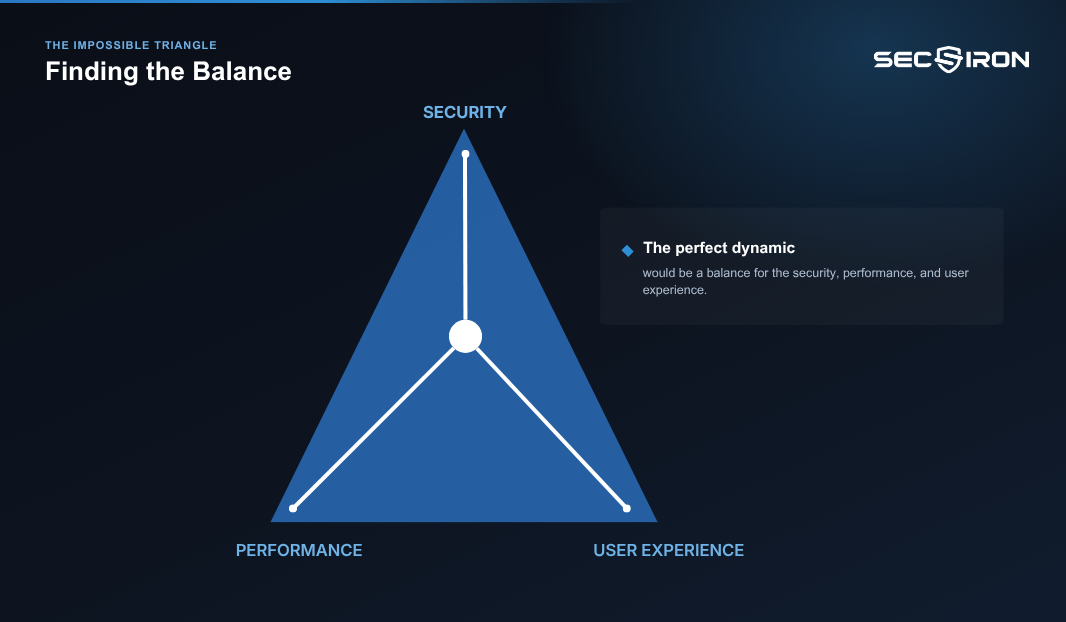
This is why single-technique protection disappoints so reliably. It is not that the technique is bad. It is that any one technique optimises for one corner and lets the others slide — and the slide is what determines whether the protection is still switched on a year later.
Three ways to get this wrong, and one way to get it right.
What Is the Difference Between Mobile App Hardening, RASP and App Shielding?
App shielding protects your code at rest, making the binary expensive to read and modify. RASP protects your app while it runs, detecting rooting, hooking, debugging and emulation on the device. Mobile app hardening is the umbrella that includes both, and adds three things neither provides on its own: a response policy you control, off-device visibility into every incident, and enforcement that keeps the protection attached to the app.
Put simply: app shielding stops when the app starts running, RASP stops when someone removes it from the binary, and hardening done badly stops when the support tickets start.
Why the Terms Blur
The confusion is not accidental. All three terms describe protection that lives inside the app rather than on your servers, and all three arrived through different doors.
RASP came from server-side application security, where it meant instrumentation inside a running application that detects and blocks attacks using request context. App shielding grew out of code obfuscation, where the goal was making a binary difficult to read. Mobile app hardening describes the full set of protections an app needs once it leaves your control.
Vendors then borrowed each other’s vocabulary. The result is that the label on the box tells you very little about what is inside it. What follows is what each term means when used precisely — and what each one costs at the other two corners.
Obfuscation Alone: Buying Performance With Security
App shielding is what happens to your binary before it ships. It covers code obfuscation, control-flow flattening, string encryption, anti-tamper checksums and packing. The purpose is to make static analysis expensive.
It works, up to a point. An attacker who downloads your app and opens it in a decompiler will find hours of work where they expected minutes, and a meaningful share of casual attackers stop there. It is also cheap at the performance corner, which is exactly why teams under release pressure reach for it first.
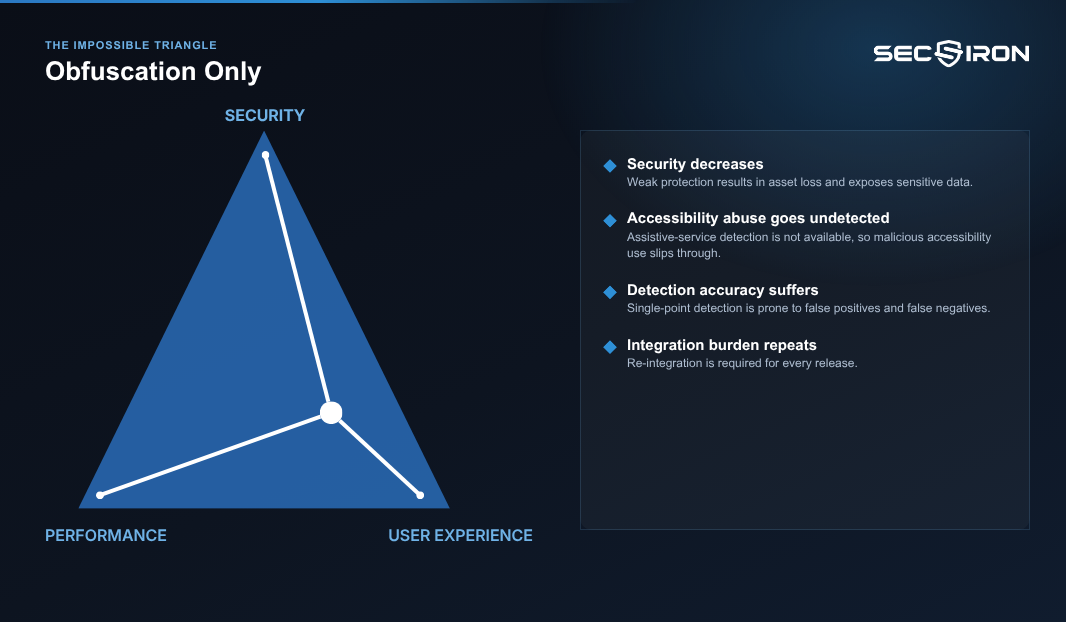
Where it stops. App shielding is static. It changes what your app looks like, not what it does. It does not observe, decide or report. Four consequences follow:
- Security decreases, and the loss lands on your assets. A shielded app that is attacked and a shielded app that is never touched produce identical evidence, which is none.
- Accessibility-assistance abuse goes undetected. Screen-reading malware that abuses accessibility permissions never reads your code at all. Encrypted strings do not slow it down by a single step.
- Single-point detection produces false positives and false negatives. One check, one signal, one verdict. Legitimate users get blocked and real attacks get through, and you have no second signal to arbitrate between them.
- Integration is required for each release. Where shielding is delivered as an SDK, every major version costs engineering time again.
That last point matters more than it looks. Protection that competes with the product roadmap for developer hours does not win that argument twice.
RASP Alone: Detection Without a Safety Net
RASP picks up where shielding stops. In mobile terms it means checks that execute inside the running app: root and jailbreak detection, debugger detection, hooking and instrumentation detection, emulator detection, certificate pinning validation.
This is real protection against real attacks, and it covers the phase where most mobile fraud actually happens — on the device, at runtime, on hardware you will never own or inspect.
Where it stops. The checks are code, and that code ships inside the binary you hand to the attacker. Two consequences follow:
- The checks can be found and removed. An attacker decompiles the app, locates the protection’s entry point, patches it out, repackages and re-signs. The app then runs with every check silently absent.
- Detection without reporting is a local decision. Many implementations decide on the device and stop there. The app knows it was attacked. You do not.
There is a structural problem underneath both. The component that would have told you the app was compromised is the same component the attacker removed. Silence is what a protected app produces, and silence is also what a stripped app produces. You cannot tell the two apart from where you are sitting.
Hardening Alone: Buying Security With Everything Else
The opposite failure, and the one nobody warns you about when you are buying.
Apply protection heavily and indiscriminately — every check on every screen, maximum enforcement everywhere — and security goes up. So does everything else you were trying to avoid.
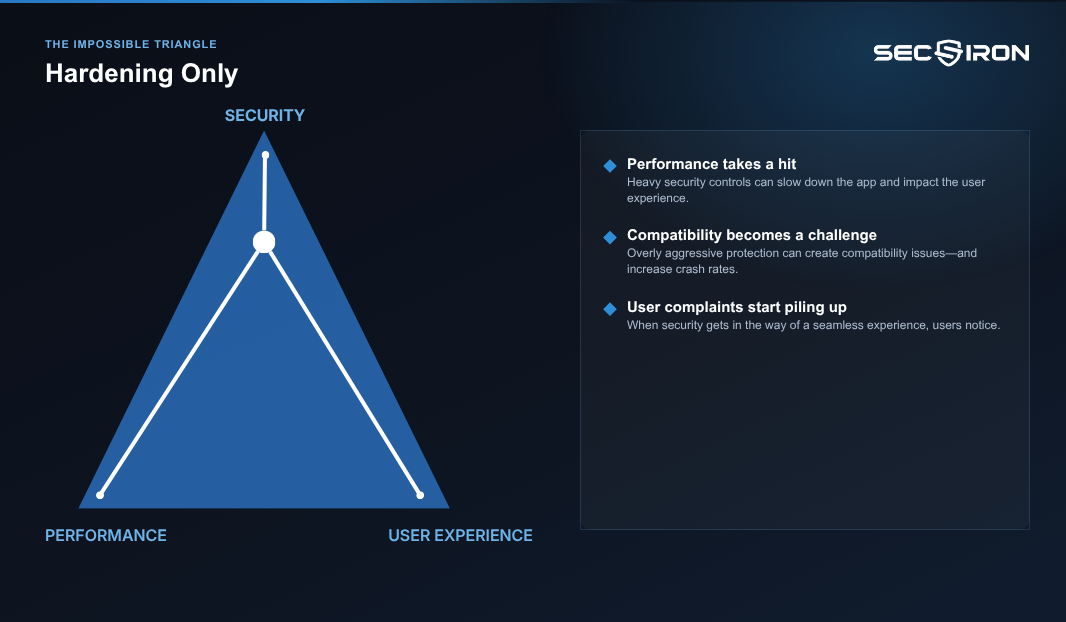
- Performance is affected, and user experience follows it down. Startup time, memory footprint and battery all move in the wrong direction.
- Compatibility issues raise crash rates. Aggressive protection interacts badly with device variants, custom ROMs and hybrid frameworks. Crashes are attributed to your app, not to your security vendor.
- User complaints rise. Blocked sessions on devices that were not actually compromised, and confusing security messages nobody wrote for a customer to read.
Here is how that ends, and it is worth naming plainly: crash rates and complaints create pressure, pressure reaches the product team, and within two quarters the protection is dialled down or switched off. The app is then less secure than if you had deployed something proportionate in the first place — and the budget is spent.
Security that gets disabled is not security. It is a line item.
Where Each One Stops
A mobile attack runs in a predictable sequence. Mapping the approaches onto it makes the coverage gaps concrete, alongside the balance costs above.
| Attack phase | App shielding | RASP | Hardening + RASP together |
|---|---|---|---|
| 1. Acquire the binary from the store | — | — | — |
| 2. Decompile and analyse the code | Covered | — | Covered |
| 3. Patch logic, inject code, repackage | Partly covered | — | Covered |
| 4. Re-sign and distribute the clone | — | — | Detected at launch |
| 5. Hook, debug or emulate at runtime | — | Covered | Covered |
| 6. Operate at scale: multi-instance, spoofing | — | Partly covered | Covered |
| 7. Report the incident to your team | — | Sometimes | Covered |
| 8. Survive an attempt to remove the protection | — | — | Covered |
Phase eight is where most evaluations end without a conclusion, because it is rarely on the list of things to test.
Finding the Dynamic Balance
The word that matters is dynamic. The balance is not a fixed setting you choose once at deployment. It is a position you hold while the app, the threat landscape and your user base all keep moving.
Four things make that possible, and none of them work alone.
1. Static and Runtime Protection Together, Not in Sequence
Static protection raises the cost of understanding your app. Runtime protection observes what is being done to it. Combined, they cover phases two through eight of the table above — and each compensates for the other’s blind corner. Shielding cannot see an attack; RASP cannot survive being cut out of a binary that was never hardened against modification in the first place.
This is what “mobile app hardening” should mean when the term is used properly: not a third alternative to the other two, but both of them delivered as one thing.
2. Layered Detection Instead of a Single Point
Single-point detection is what produces false positives and false negatives, because one signal has to carry the entire verdict. Several independent signals, weighed together, let the app distinguish a rooted phone belonging to a developer from a rooted phone running an instrumentation framework against your payment screen.
Fewer false positives means fewer blocked customers. Fewer blocked customers means less pressure to disable the protection. The user experience corner is defended by better detection, not by less of it.
3. Proportionate Response, Set by You
Not every detection deserves the same answer. A rooted device might restrict high-value functions while leaving the rest of the app usable. An overlay drawn across a payment screen should stop the transaction. A hooking framework attached at runtime should end the session.
Graduated response is how you keep security high at the moments that matter without spending user experience at the moments that do not.
4. Codeless Deployment
If protection is applied to the built app rather than integrated into the source, the per-release integration cost disappears. Your engineers do not rewrite anything, protection is a pipeline step, and updating for a new attack technique does not require a sprint.
That removes the pressure that causes most of the corner-cutting in the first place.
The Four Questions
You do not need a technical deep-dive to separate these approaches. Four questions do most of the work — three about security, and one about what that security costs you.
1. Does It Know It Was Attacked, or Only Make Attacking Harder?
This separates deterrence from detection. Obfuscation deters. Runtime checks detect. Both belong in the app, but only one of them can ever tell you something happened.
Ask the vendor to describe what the app knows after an attack, as distinct from what it prevented.
2. Does It Tell You, and How Quickly?
Protection that decides locally and reports nothing leaves you with a quiet app and no idea what it survived. When a regulator, a board or a post-incident review asks what protected the app and what it caught, “we deployed a security product” is not an answer. A dated, exportable incident record is.
Ask what arrives off the device, how fast, and in what form. Then ask to see the log filling in real time rather than a screenshot of one.
3. What Happens When Your Protection Is Removed From the Binary?
This is the question that changes answers, and it is the one most evaluations skip.
Most mobile protection is delivered as an SDK or library. It sits in the shipped binary as identifiable code with an identifiable entry point. An attacker who finds it can remove it, repackage the app and distribute it — and the app will run, serve your customers, and report nothing, because the component that reports is the component that was removed.
Every vendor will tell you their protection is difficult to remove. Ask them to demonstrate what happens when it is.
4. What Does It Cost at the Other Two Corners?
The question almost nobody asks in a security evaluation, and the one that decides whether the protection is still running next year.
Ask for a measured figure on startup time, memory and battery, stated on the record and verified against your own app rather than a benchmark build. Ask what the crash rate looked like across device variants and hybrid frameworks. Ask what the false-positive rate is, and how it is tuned. Then ask how many customers have dialled the protection down after deployment, and why.
A vendor who has never been asked the fourth question will show it.
A Note on Terminology
One caution before you build a shortlist. These three terms are used loosely across the market. Some vendors use “app shielding” to describe a package that includes runtime protection, while others use “RASP” for something closer to full hardening.
Do not evaluate the label. Evaluate the eight rows in the table above, ask each vendor to place their own product on it, and then ask what each row costs at the performance and user experience corners. The exercise is quick, and the differences it exposes are the ones that matter after you have signed.
Partner for Mobile App Security
Set against those four questions, mobile app hardening has to do four things that neither shielding nor RASP does on its own: recognise that the app was attacked, report it off the device, keep working when someone tries to remove it, and do all of that without spending the performance and user experience budget it was given.
The third is the rarest, and the one worth weighting most heavily. Protection that ships as removable code inherits the removal problem no matter how good its detection is, because the component that would report the compromise is the component the attacker takes out.
SecIron enforces its own presence. Attempt to strip the protection out of the binary and the app alerts, or exits — a capability no competitor fully matches, and one that can be demonstrated on a customer’s own app rather than described in a deck.
IronWall
combines static hardening with runtime self-protection, applied to the built app so there are no source-code changes, no SDK integration work and nothing for an engineering team to rewrite. It detects rooting, jailbreaking, emulators, hooking frameworks, repackaging, debugging, spoofed environments and accessibility-assistance abuse through behaviour rather than signature lists; protects code, memory, storage and traffic while the app runs; weighs several signals together rather than deciding on a single point, which is what keeps false positives and blocked customers down; and responds according to a policy the customer sets, per threat and per app.
IronSky
is mission control for the app. Every incident is logged the second it happens, with threat type, device conditions, app version, geography and the action taken, across an entire app portfolio in one view. Records are exportable, so the evidence an auditor asks for already exists when they ask for it. That telemetry is also how the balance stays dynamic — watching which detections fire, on which devices, and how often they turn out to be legitimate users is what lets you tune the policy over time instead of setting it once and hoping.
SecIron has worked in this one category for 16 years. More than 10,000 apps run with its protection, and 70+ Global Fortune 500 organisations are customers.
Deployment is codeless, which is why a proof of concept runs on a customer’s own app in days, and protection updates ship in days, not weeks.
Conclusion
Security, performance and user experience pull against each other, and no single technique holds all three. Obfuscation alone buys performance with security. RASP alone has no safety net when someone removes it. Hardening applied without proportion buys security with crash rates and complaints, and ends up switched off.
The balance is held by combining static and runtime protection, detecting on several signals rather than one, responding proportionately, and deploying without touching source code. If you are comparing options now, run the four questions across your shortlist in a single week — they are answerable in a live session, and they will separate the field faster than any feature matrix.
If you want the detail before the conversation, the IronWall and IronSky pages set out what each layer covers and what lands in the dashboard. And if you are working out how hardening would sit alongside your existing controls, what it means for your release process, or what your regulator will expect of a mobile app, talk to our expert team. Those questions are faster to answer in twenty minutes than in twenty pages.
Ready to launch a secure app?
From deployment to security and beyond, SecIron takes you from visibility to action.
Recent Posts


Android App Protection: A Practical Guide
October 4, 2026
What Is Anti-Tampering? How Apps Detect Modification
October 1, 2026